Videos
The videos page lists every video across your connected channels, and each video opens into a detail page showing how it performed and what ran in it.
Browsing your videos
Section titled “Browsing your videos”The stat cards at the top summarize the selected period: total videos, total views, sponsor placements, and average engagement. Below them, every video is listed with its channel, publish date, views, engagement, audience sentiment, and whether sponsors ran in it.
You can slice the list a few ways:
- Sentiment filter: all sentiment, positive, or negative
- Sponsored filter: all videos, sponsored, or not sponsored
- Sort: newest, oldest, most views, highest engagement, most placements, or title A to Z
- Search: find a video by title
- Grid or list: switch between card and table layouts
The channel and date-range filters at the top of the page apply here too, and the list is paginated so large back catalogs stay manageable.
Video details
Section titled “Video details”Select a video to open its detail page.
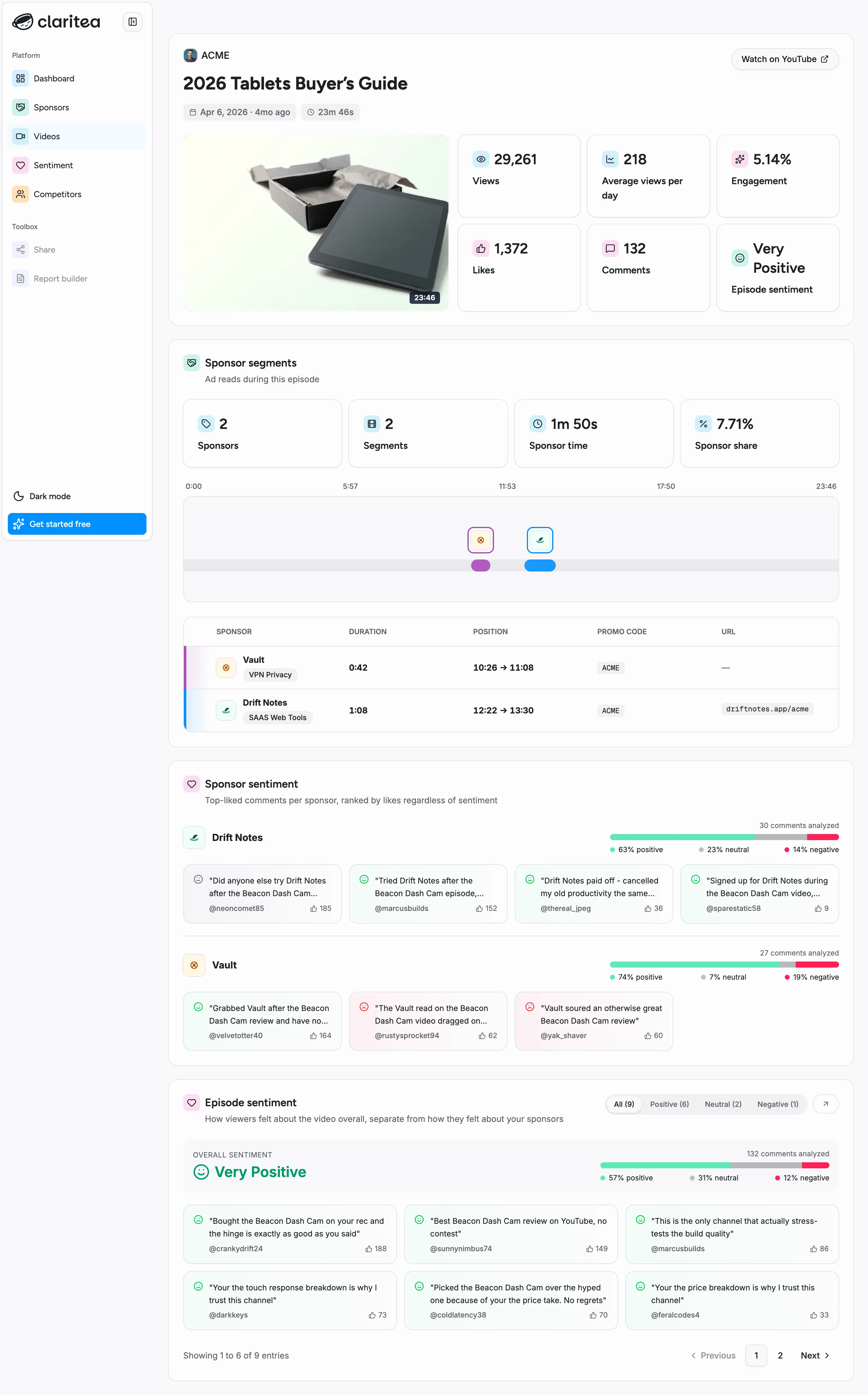
Summary
Section titled “Summary”The top card shows the video with a link to watch it on YouTube, plus its key numbers: views, average views per day, engagement, likes, comments, and the overall episode sentiment.
Sponsor segments
Section titled “Sponsor segments”If sponsors ran in the video, this widget breaks down the ad reads: how many sponsors, how many segments they ran across, total sponsor time, and what share of the video was sponsored. A timeline shows where each read sits in the episode, and the table below lists every read with its duration, position, and any promo code or URL spoken in it. A sponsor that reads more than once in the same video appears on more than one row, which is why the segment count can be higher than the sponsor count.
Sponsor sentiment
Section titled “Sponsor sentiment”The top-liked comments mentioning each sponsor, ranked by likes regardless of sentiment - a quick read on how the audience reacted to each brand in this specific video.
Episode sentiment
Section titled “Episode sentiment”How viewers felt about the video overall, separate from how they felt about your sponsors. You get the overall verdict with a positive, neutral, and negative breakdown, plus the actual comments - filter them by sentiment to read just the praise or just the criticism.