Competitors
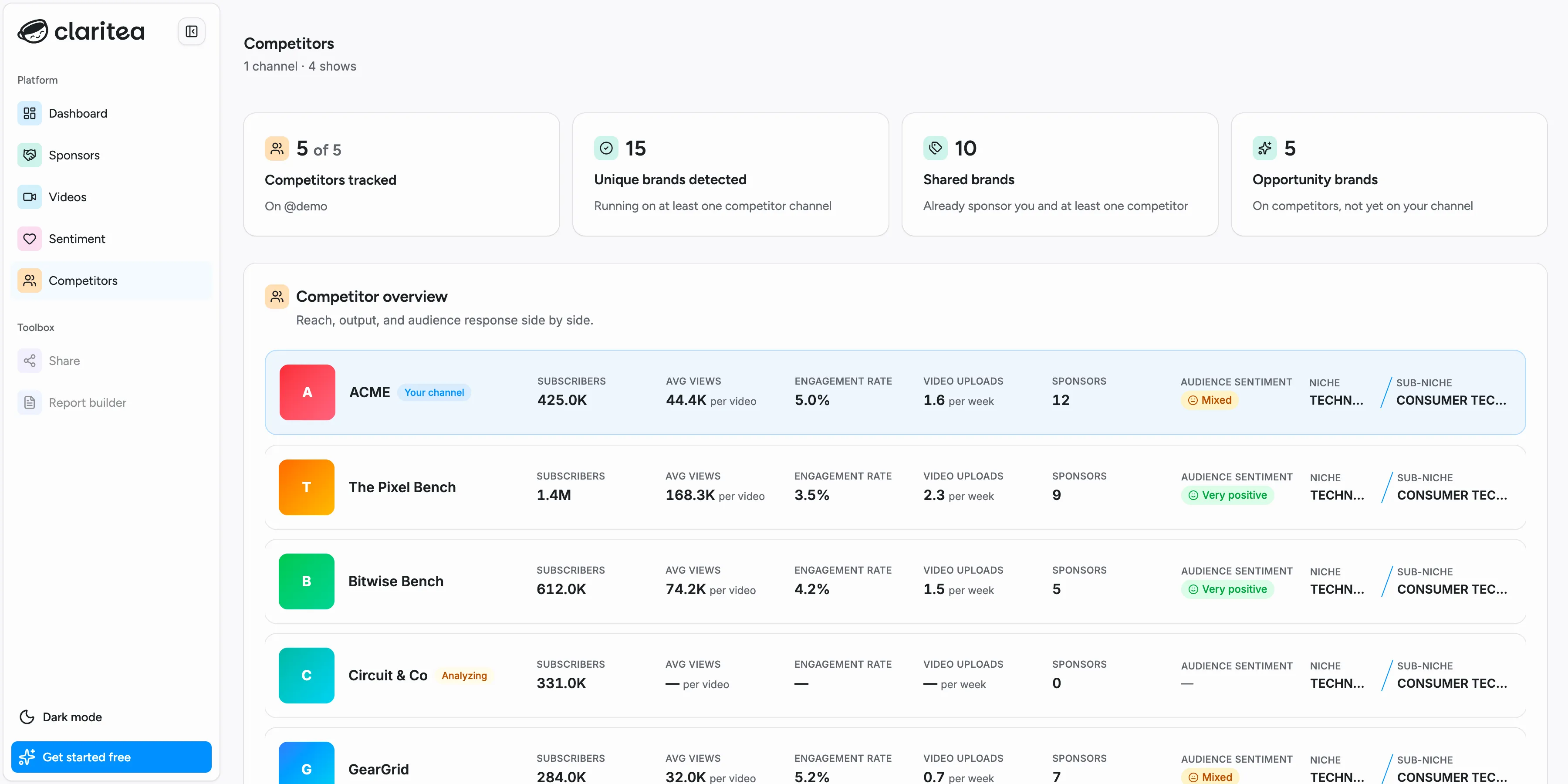
The competitors page puts one of your channels side by side with other channels in your niche, and shows which brands run on them. It answers two questions: how you compare on reach and output, and which sponsors your competitors have that you do not.
Everything on this page is scoped to a single channel. If you have more than one connected, switch between them with the channel tabs.
Choosing who to track
Section titled “Choosing who to track”You pick the channels you want to compare against. Your account can track five competitors in total, shared across all of your channels rather than five per channel. That is why the page can tell you your five are already assigned and none of them are on the channel you are currently looking at.
On your own competitors page, once you are tracking at least one, a pill in the top right reports how many competitors you are tracking, with a Change competitors button beside it. Before then, the page invites you to pick your first.
Changing the set draws on an allowance of five changes. Only additions count against it: removing a competitor, or changing which of your channels one is compared with, is free. The picker states the rule up front, as “Adding a competitor uses one of your 5 changes this billing period”. The running balance, which reads like “2 of 5 changes left this billing period”, appears later when you assign channels or confirm the change. On the Free plan there is no billing period, so the allowance runs in fixed 30-day windows from when you signed up.
At zero remaining, Change competitors is locked until the window resets, including for removals.
A competitor you have just added shows an Analyzing badge until Claritea has been through its videos. The rest of the page keeps working while that happens.
Reading the top cards
Section titled “Reading the top cards”- Competitors tracked: how many of your five slots are in use, on the channel named underneath
- Unique brands detected: brands running on at least one of the channels you track
- Shared brands: brands that already sponsor you and at least one competitor
- Opportunity brands: brands on your competitors that are not yet on your channel
Competitor overview
Section titled “Competitor overview”Your channel and each competitor on one row, so the comparison reads across: Subscribers, Avg views per video, Engagement rate, Video uploads per week, Sponsors, Audience sentiment, and the Niche and Sub-niche Claritea has classified the channel into. Your own row is marked Your channel.
A cell showing a dash has no figure to report yet. On a competitor that is still analyzing, its subscriber count is already real, because it comes from the channel rather than from its videos. Its sponsor count is not: nothing has been read yet, so a zero there means “not counted yet” rather than “runs no sponsors”. Elsewhere on the page Claritea says Analyzing instead of showing that zero, for exactly that reason. A dash can also appear on a competitor that has finished analyzing but whose statistics have not been rebuilt yet, so read it as “not available” rather than as a statement about the channel.
Audience sentiment for competitors is a Pro feature. On the Free plan that column shows a Pro badge instead of a rating. Everything else in the table is available on both plans.
Sponsor share
Section titled “Sponsor share”One row per competitor, showing how many sponsors it runs, how many it shares with you, and how many are gaps you could pitch. Open a row to see the brands behind those counts. A competitor that is still analyzing cannot be opened yet.
This is the section to read when you want a specific conversation to have: a brand sitting in a competitor’s gap column is already spending in your niche, on a channel like yours, and is not spending with you.
Top shared sponsors
Section titled “Top shared sponsors”The brands that already run on both your channel and your competitors, each with its category and how many of your tracked competitors it runs on. A brand on most of your competitors and on you is a category where you are competing directly for the same budget.
Top opportunities
Section titled “Top opportunities”The reverse view: brands across your competitors that have never run on your channel, ranked by how many of your competitors they sponsor. A brand running on all of your competitors and none of your videos is the clearest pitch on the page.
Select any brand in either list to open its sponsor page.